How to Do Affiliate Marketing on Pinterest Without a Blog
Table Of Contents
Quick Answer: Yes — you can do affiliate marketing on Pinterest without a blog. Pinterest officially allows direct affiliate links in pins. You create a free Business account, join an affiliate programme (ShareASale, LTK, ClickBank), design a pin in Canva, paste your affiliate link as the destination URL, and earn commissions when people click and buy. The full process costs $0 and takes about 2 hours to set up.
Can You Really Do Pinterest Affiliate Marketing Without a Blog?
Pinterest is not a social media platform in the traditional sense. It’s a visual search engine — and that distinction changes everything. When someone types “budget kitchen decor ideas” into Pinterest, they’re actively looking to buy, browse, or get inspired. That buying intent is gold for affiliate marketers.
Unlike Instagram or TikTok (where content dies within 24 hours), a well-optimised Pinterest pin can rank in search and drive clicks for months or even years after you publish it. According to Pinterest’s own data, the platform has 570 million monthly active users — and one in three earns over $100,000 annually.
This guide covers everything: the rules, the setup, which programmes to join, how to design converting pins, and the exact step-by-step process to go from zero to your first commission — all without spending a penny.
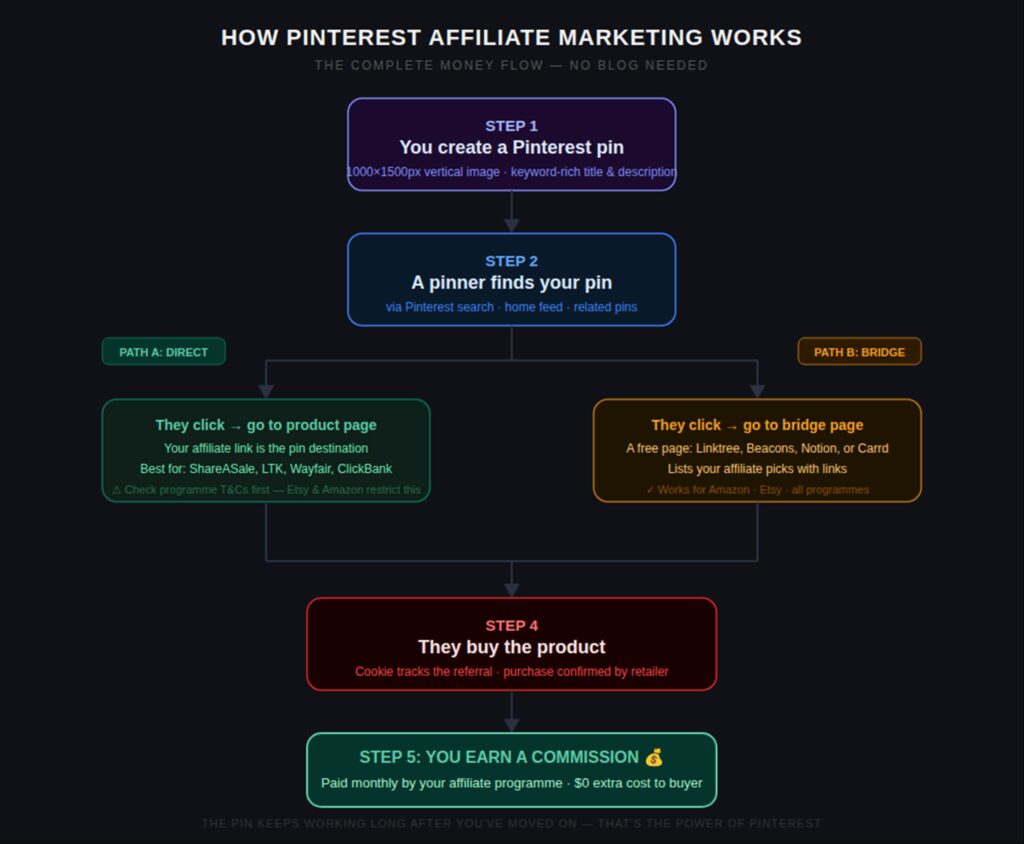
Infographic: How the money flows — from pin to commission, step by step
The Rules: What Pinterest Does (and Doesn’t) Allow
Before anything else, you need to understand Pinterest’s affiliate rules. Getting this wrong can get your account suspended.
What IS Allowed
- Direct affiliate links: You can paste your affiliate link directly as a pin’s destination URL. Pinterest’s official creator guidance confirms this is permitted.
- Affiliate links from most major networks: ShareASale, LTK/RewardStyle, ClickBank, Impact, CJ Affiliate, Wayfair, and Shopify Partners all explicitly allow Pinterest linking.
- Multiple pins per product: You can create several different pin designs linking to the same product, as long as each one is visually original.
- Affiliate pins in group boards: Most group boards allow affiliate pins, but check the individual board rules — some restrict them.
What is NOT Allowed
⚠ IMPORTANT: Violating these rules can result in your account being suspended or permanently banned. Read carefully.
- No link shorteners or redirectors: Pinterest requires the final destination domain to be visible. You cannot use bit.ly, TinyURL, or any link cloaker. Pinterest’s policy states that affiliate partnerships must not be hidden.
- No spam behaviour: Don’t create 50 pins in one day all linking to the same product. Pinterest’s spam filter will flag you. Space out affiliate pins and mix them with non-affiliate content.
- Must disclose every affiliate pin: FTC rules require disclosure. Add “This pin contains affiliate links” or #affiliate to every pin description. Non-disclosure is a legal issue, not just a platform issue.
- Amazon Associates — caution required: Amazon’s Terms of Service state you must only post links on sites or platforms you own or control. Sending traffic from Pinterest to Amazon directly is risky. The safest approach: use a bridge page (a free Linktree or Beacons page) that contains your Amazon links.
- Etsy affiliates — no direct Pinterest links: Etsy’s affiliate policy via Awin specifically prohibits posting affiliate links directly on Pinterest. You must use a blog post or bridge page.
The 80/20 Rule: 80% of your pins should be valuable, non-affiliate content (tips, inspiration, guides). Only 20% should be affiliate pins. This keeps your account healthy and your audience engaged.
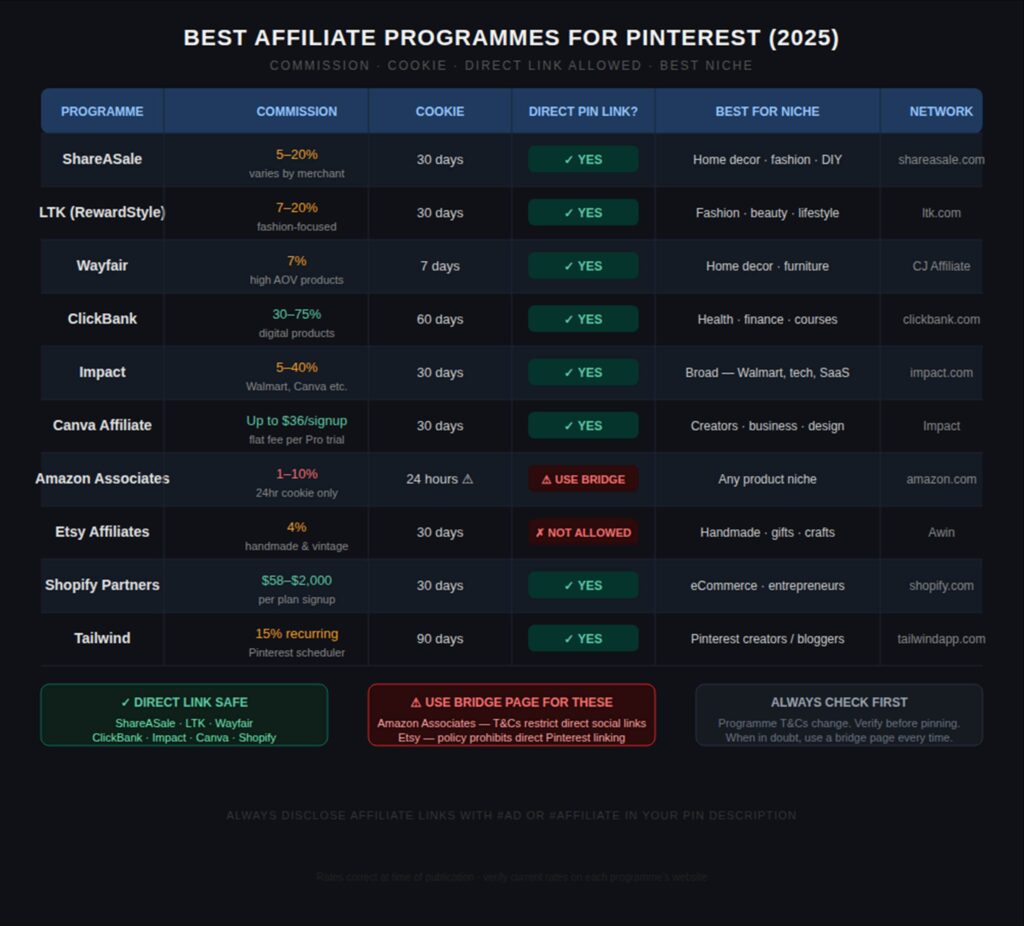
Infographic: Best affiliate programmes for Pinterest — commissions, cookies, and direct link rules
Step-by-Step Setup: From Zero to First Commission
Here’s the complete setup process. You can do all of this in a single afternoon with no budget.
| Step | What To Do | |
| Step 1 | Create a Pinterest Business Account | Go to pinterest.com/business/create — it’s free. Convert your personal account in Settings if you already have one. Business accounts unlock analytics, rich pins, and the full keyword tool. |
| Step 2 | Optimise Your Profile for SEO | Use your niche keyword in your name and bio. E.g. “Budget Home Decor Ideas | Affiliate & Styling Tips”. Add a profile photo and your website/bridge page URL. |
| Step 3 | Create 10–15 Niche Boards | Each board should target one keyword cluster. Name them exactly as people search: “Small Living Room Ideas”, “Budget Kitchen Decor”, “Amazon Home Finds”. Add 200-word keyword-rich descriptions to each. |
| Step 4 | Join Your Affiliate Programme(s) | Apply to ShareASale, LTK, ClickBank, or whichever programme fits your niche. Approval is usually instant. Get your unique tracking links. |
| Step 5 | Create Your First 10 Pins | Use Canva (free). Size: 1000×1500px. Include a text overlay with your keyword, a clear image, and a compelling title. Add your affiliate link as the destination URL. |
| Step 6 | Add Disclosure to Every Pin | In your pin description, include: “Contains affiliate links. I may earn a small commission at no extra cost to you.” This is FTC-required — don’t skip it. |
| Step 7 | Post Consistently (1–3 pins/day) | Use Tailwind (free plan) or Pinterest’s own scheduler to drip-feed pins. Consistency signals quality to the algorithm. Don’t post 20 at once. |
| Step 8 | Analyse and Optimise | After 30 days, check Pinterest Analytics. Which pins got the most outbound clicks? Create more of those. Kill designs that aren’t working. |
Step 1: Set Up Your Pinterest Business Account (10 minutes)
Go to pinterest.com/business/create and create a free Business account. If you already have a personal Pinterest account, you can convert it in Settings → Account → Convert to Business.
Why Business and not Personal? Business accounts give you access to Pinterest Analytics (so you can see which pins drive clicks), the Pinterest Trends tool (for keyword research), and Rich Pins (which automatically pull metadata from product pages).
Profile optimisation — do this now:
- Username: use your niche keyword + your name/brand. E.g. “budgethomedecor_emma” or “fitnessfindswithkate”
- Display name: “[Keyword] | [Value proposition]” — e.g. “Budget Home Decor | Amazon Finds & Style Tips”
- Bio: 160 characters. Lead with your primary keyword. E.g. “Sharing the best budget home decor finds from Amazon and Wayfair. Affiliate links — I only recommend what I own.”
- Website: Add your bridge page URL (Linktree, Beacons, or Carrd — all free). This is where you’ll send people for Amazon or Etsy links.
- Profile photo: Use a clear headshot or niche-relevant logo. Accounts with a photo perform significantly better.
Step 2: Build Your Board Structure (30 minutes)
Your boards are how Pinterest understands your niche and surfaces your pins to the right audience. Get this right and the algorithm works for you. Get it wrong and even great pins won’t rank.
How to name boards: Use the exact phrase people search on Pinterest. Go to the Pinterest search bar and start typing your niche — the autocomplete suggestions are exactly how real users phrase their searches. Use those phrases as board names.
Examples for a home decor account:
- “Small Living Room Ideas” — not “Living Room”
- “Amazon Home Finds Under $50” — not “Amazon”
- “Cosy Bedroom Decor Ideas” — not “Bedroom”
- “Budget Kitchen Organisation” — not “Kitchen”
Board descriptions: Write 150–200 words using your target keyword naturally 3–5 times. Pinterest reads these descriptions for search ranking — treat them like mini meta descriptions.
How many boards? Start with 10–15 boards. Create a mix of specific product boards (“Amazon Kitchen Gadgets”), style boards (“Minimalist Home Decor”), and problem-solution boards (“Small Space Storage Solutions”).
Step 3: Join Your Affiliate Programme(s) (15 minutes)
You only need one programme to start. Here’s the signup link for each beginner-friendly option:
- ShareASale — free to join, 4,000+ merchants, instant access to most programmes. Best starting point for beginners.
- LTK (RewardStyle) — ideal for fashion, beauty, and lifestyle. Requires an application but approval is fast for accounts with any content presence.
- ClickBank — no approval needed, instant access to hundreds of products. Best for health, fitness, finance, and self-improvement niches.
- Impact — home to Canva, Shopify, Walmart, and hundreds of others. Free to join the network, then apply per-programme.
- Wayfair Partner Programme — 7% commission, perfect for home decor pins. Apply via CJ Affiliate.
Get your tracking link: Once approved, find the product you want to promote, generate your unique affiliate link, and copy it. This is what you’ll paste as your pin’s destination URL.
Step 4: Create Your First Pins in Canva (45 minutes)
This is where most beginners overthink. The goal is not a design masterpiece — it’s a clear, keyword-rich, clickable image. Canva is free and has thousands of Pinterest pin templates.
The correct pin dimensions: 1000 × 1500 pixels (2:3 ratio). This is Pinterest’s recommended size. Wider or shorter pins get cropped in the feed.
What Every Affiliate Pin Needs:
- A strong headline on the image: Use your keyword. “10 Amazon Kitchen Finds Under $30” beats “Great Products”. Numbers, “under $X”, and curiosity gaps all increase clicks.
- High-quality visual: Use the product’s own image (check the programme’s guidelines on image use), a lifestyle photo that shows the product in use, or a styled flat lay. Unsplash and Pexels have free lifestyle photos.
- Your branding: Add your account name or logo in small text at the bottom. Builds recognition over time.
- A clear CTA: A small button or text that says “Shop Now”, “See Full List”, or “Save for Later”.
Pin title (in the Pinterest uploader, not the image): 100 characters max. Lead with your primary keyword. E.g. “10 Amazon Kitchen Finds Under $30 You’ll Actually Use 🍳”
Pin description (500 characters): Write naturally with your keyword in the first sentence. Include a call to action. End with: “This pin contains affiliate links — I earn a small commission at no extra cost to you.”
Pro tip: Create 3–5 different pin designs for the same product. Different visuals, same link. Pin them to different boards 5–7 days apart. This multiplies your exposure without spamming.
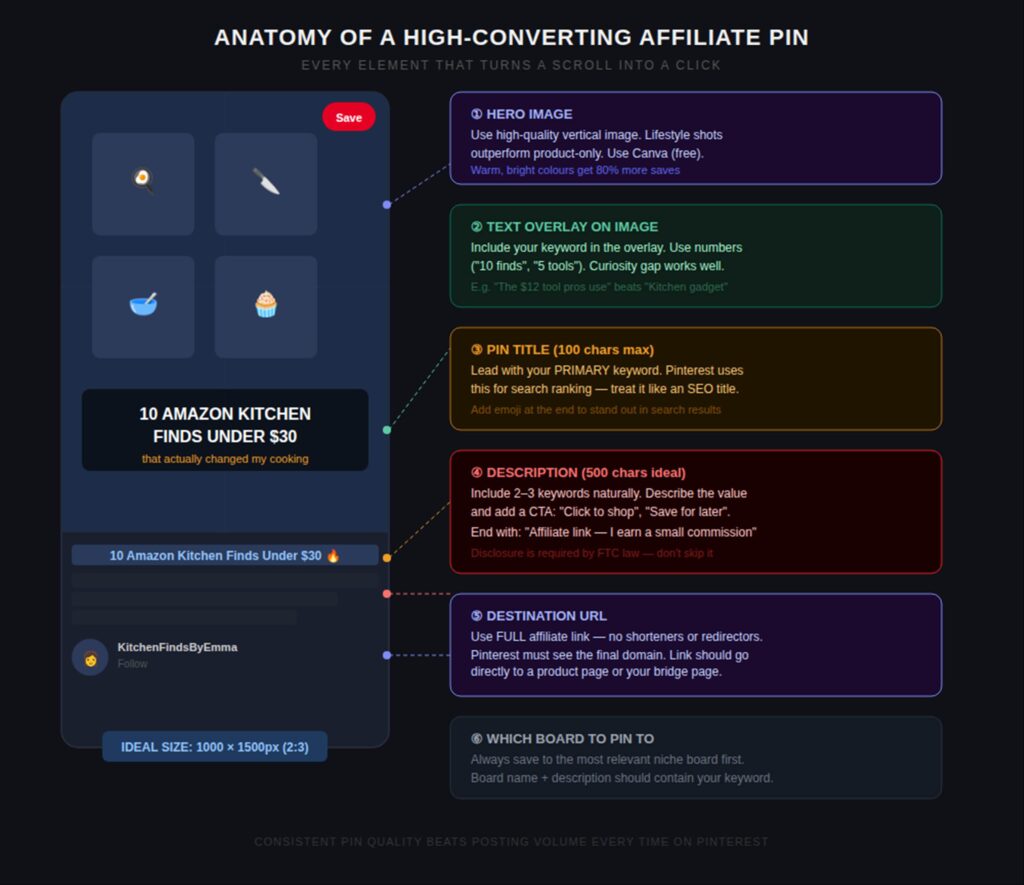
Infographic: Anatomy of a high-converting affiliate pin — every element explained
Step 5: Set Up Your Bridge Page (Optional but Recommended — 20 minutes)
A bridge page is a simple link-in-bio style page that lists your affiliate recommendations. You need one for Amazon links, Etsy links, and any programme that restricts direct Pinterest linking.
Free bridge page tools:
- Linktree — free plan allows unlimited links. Clean, professional layout. Most popular option.
- Beacons — slightly more customisable than Linktree on the free plan. Good for adding images alongside links.
- Carrd — build a one-page mini website free. More flexible design but requires 5–10 minutes to set up.
- Stan Store — free tier, designed for creators. Allows you to list products with images and links.
How to use it: Create a page titled “My Favourite [Niche] Picks” and add your top 10–20 affiliate products with images, prices, and links. Your Pinterest profile and relevant pin destinations all point to this page. When someone browses your picks and clicks through to buy anything, you earn the commission.
The bridge page advantage: Instead of one pin leading to one product, your bridge page exposes every visitor to your entire curated list. One click = multiple potential commissions. It also lets you capture email subscribers if you add a sign-up form.
Step 6: Pinterest SEO — How to Get Found Without Followers
This is the most important section for long-term success. Pinterest is a search engine — you don’t need followers to get traffic. You need keywords.
How Pinterest search works: When you type “cosy bedroom ideas” into Pinterest, the algorithm matches that phrase against pin titles, descriptions, board names, and board descriptions. The more precisely your content matches high-volume search terms, the more people see your pins.
How to Find the Right Keywords (Free):
- Pinterest search autocomplete: Type your niche into Pinterest search. The auto-suggested phrases are real searches. Use these as board names and pin titles.
- Pinterest Trends: Available free at trends.pinterest.com. Shows seasonal and trending topics — invaluable for planning your content calendar.
- Competitor research: Find 3–5 successful accounts in your niche. Look at their most-saved pins. What phrases are they using in titles and descriptions?
- Guided search bubbles: After searching a phrase on Pinterest, coloured bubbles appear below the search bar with related terms. Click each one to find sub-niches with less competition.
Keyword placement priority: (1) Pin title — most important. (2) First sentence of pin description. (3) Board name this pin is saved to. (4) Board description.
Long-tail keywords outperform broad ones. “Best budget sectional sofa under $500” will rank faster and convert better than “sofa” because the searcher’s intent is crystal clear.
Step 7: How Often to Post (Without Getting Flagged as Spam)
Consistency beats volume on Pinterest. Posting 2–3 fresh pins per day every day outperforms posting 30 pins one day and nothing for a week.
Recommended schedule for beginners:
- Week 1–4: 1–2 pins per day. Mix affiliate and non-affiliate content.
- Month 2+: Build to 3–5 pins per day as you create more content
- Never more than 20% affiliate: For every 1 affiliate pin, post 4 value pins (tips, inspiration, how-tos)
Free scheduling tools: Tailwind‘s free plan (limited pins), Pinterest’s own built-in scheduler (unlimited, free), or Buffer‘s free plan.
Best times to post: Pinterest is used heavily in the evenings (8–11pm) and weekends. Use Pinterest Analytics to see when your specific audience is most active.
Best Niches for Pinterest Affiliate Marketing in 2025
Not all niches perform equally on Pinterest. The platform skews heavily towards visual, aspirational, and solution-seeking content.
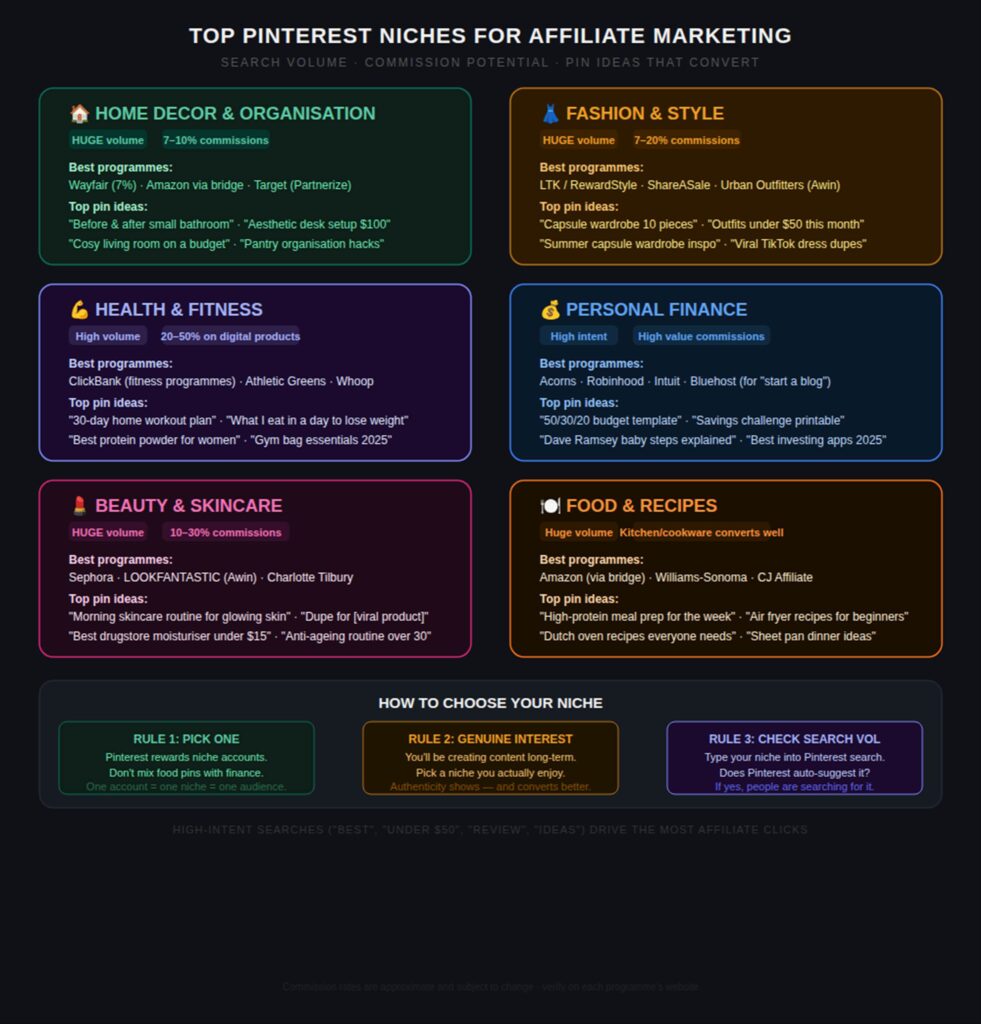
Infographic: Top Pinterest niches with pin ideas and best affiliate programmes for each
The 8 Best-Performing Pinterest Niches for Affiliates:
- Home decor and organisation — The #1 niche on Pinterest by volume. Wayfair (7%), IKEA via Awin, and Amazon (via bridge) all work well.
- Fashion and style — LTK/RewardStyle is the dominant programme. Seasonal content (summer outfits, winter coats) gets huge traffic spikes.
- Health and fitness — ClickBank offers 30–75% commission on fitness programmes. Athletic equipment via Amazon (bridge) converts well.
- Personal finance and budgeting — Growing niche. Budget trackers, savings challenges, and investing app referrals (Acorns, M1 Finance) all work.
- Beauty and skincare — Sephora and LOOKFANTASTIC via Awin. “Dupe” content (affordable alternatives to luxury products) goes viral regularly.
- Food, recipes and kitchen — Amazon (via bridge) for kitchen tools, Williams-Sonoma via CJ. Recipe content drives huge traffic even if it’s not directly about products.
- DIY and crafts — Michaels and Blick Art Materials via ShareASale. Tutorial-style pins drive the best click-through rates.
- Digital products and online tools — Canva ($36 per Pro trial via Impact), Shopify ($58–$2,000 per signup), Tailwind (15% recurring). High commissions, no shipping concerns.
5 Mistakes That Kill Pinterest Affiliate Accounts
- Posting only affiliate pins. Accounts that only post affiliate content get suppressed by Pinterest’s algorithm. The 80/20 rule is non-negotiable — 80% value content, 20% affiliate.
- Using link shorteners. bit.ly, TinyURL, and any redirect service are explicitly banned. Pinterest will reject the pin or suppress your account. Always use the full affiliate URL.
- Skipping disclosure. Not disclosing affiliate relationships is a legal violation under FTC guidelines, not just a Pinterest policy issue. Add “Contains affiliate links” or #affiliate to every single affiliate pin. No exceptions.
- Ignoring Pinterest SEO. Most beginners write vague pin titles like “Amazing finds!” instead of keyword-rich titles like “10 Amazon Kitchen Finds Under $30”. The difference in traffic can be 100x.
- Giving up before 90 days. Pinterest has a well-known “sandbox” period for new accounts where reach is intentionally limited. Most creators see very little traction in the first 45–60 days, then a sharp increase. The people who quit at day 60 miss the inflection point entirely.
How Much Can You Realistically Earn?
Pinterest affiliate earnings vary enormously by niche, commission rates, and how well-optimised your pins are. Here’s a realistic breakdown:
- Month 1–2: $0–$50. Most of this time is setup, learning, and your account being in Pinterest’s sandbox period. Don’t judge success yet.
- Month 3–6: $50–$300/month. Pins start ranking. You’re learning what works. First consistent commissions arrive.
- Month 6–12: $200–$1,000/month. If you’ve been consistent and optimising, this is where growth becomes noticeable.
- Year 2+: $500–$5,000+/month for well-established niche accounts. Evergreen pins continue earning for years.
Higher-earning niches (tech, finance, business tools) will see larger commissions per conversion but lower click-through rates. Lower-earning niches (home decor, fashion) get huge traffic but smaller commissions per sale. Both can be profitable — the math just works differently.
The compounding effect: A pin you posted 18 months ago is still ranking and sending traffic today. Unlike Instagram, where content dies in 24 hours, Pinterest rewards longevity. This makes the early effort worth far more than it looks at the time.
Free Tools You’ll Actually Need
- Canva — pin design. Free plan is sufficient. 1000×1500px vertical format.
- Pinterest Trends — free keyword and seasonal trend research.
- Tailwind — pin scheduling. Free plan includes limited pins/month. Paid plan ($14.99/mo) unlocks unlimited scheduling and SmartSchedule.
- Linktree — free bridge page for Amazon/Etsy links.
- ShareASale — best all-round free affiliate network for beginners.
- Google Analytics or your bridge page’s built-in analytics — to track which pins send traffic.
- Pinterest Analytics — available free inside your Business account. Track impressions, clicks, and outbound click rate per pin.
Frequently Asked Questions
Do I need a website to do affiliate marketing on Pinterest?
No. Pinterest allows direct affiliate links in pins, so you can earn commissions without ever owning a website. However, a free bridge page (via Linktree or Beacons) is strongly recommended for programmes like Amazon Associates and Etsy that restrict direct Pinterest linking.
Is affiliate marketing allowed on Pinterest?
Yes — Pinterest officially allows affiliate marketing. You can include affiliate links in pin destination URLs. You must disclose affiliate relationships (FTC requirement) and must not use link shorteners or hidden redirectors.
Which affiliate programme is best for Pinterest beginners?
ShareASale is the best starting point: free to join, no traffic minimum, thousands of merchants across every niche, and direct Pinterest linking is allowed. LTK is the best choice if you’re in fashion or beauty. ClickBank is best for health, finance, and digital product niches.
Can I use Amazon affiliate links on Pinterest?
This is a grey area. Amazon’s Terms of Service state you should only post links on sites you own or control. Most affiliates use a bridge page (free Linktree or Beacons page) as an intermediary — your pin links to your bridge page, which lists your Amazon recommendations. This is both Amazon-compliant and often converts better, because visitors see your full recommendation list rather than a single product.
How many pins should I post per day?
For new accounts: 1–3 pins per day. For established accounts (3+ months): 3–5 pins per day. Never post more than 10 pins in a single day — Pinterest’s spam filter will flag excessive pin activity. Consistency over time matters more than volume in any single day.
How long does it take to make money with Pinterest affiliate marketing?
Most creators see their first commissions within 30–90 days if they’re posting consistently and using keyword-optimised titles and descriptions. Meaningful income ($200–$500/month) typically takes 4–8 months of consistent effort. Pinterest has a sandbox period for new accounts where reach is deliberately limited — push through it.
Do I need to disclose affiliate links on Pinterest?
Yes — this is a legal requirement under FTC guidelines, not just a Pinterest preference. Add “Contains affiliate links” or “#affiliate” to every pin description that links to an affiliate product. Failure to disclose can result in FTC enforcement action. For detailed guidance, see the FTC’s Endorsement Guide.
What is a bridge page and do I need one?
A bridge page is a simple link-collection page (built free on Linktree, Beacons, or Carrd) that sits between your Pinterest pin and your affiliate links. It’s required for Amazon Associates and Etsy affiliates (who prohibit direct Pinterest linking), and recommended for any niche where you want to showcase multiple products per click. Free tools like Linktree take 10 minutes to set up.
Start Today: Your First-Week Action Plan
Here’s everything to do in your first seven days, in order:
- Day 1: Create your Pinterest Business account. Optimise your profile with your niche keyword.
- Day 2: Create 10 boards. Write keyword-rich descriptions for each.
- Day 3: Sign up to ShareASale (or your chosen programme). Get approved. Copy your first affiliate link.
- Day 4: Create a free bridge page on Linktree or Beacons if you plan to use Amazon or Etsy.
- Day 5: Design your first 5 pins in Canva. Use 1000×1500px. Add keyword-rich titles.
- Day 6: Publish your first 2 pins. Add disclosure to each description. Save to the most relevant board.
- Day 7: Research 10 more keyword ideas using Pinterest autocomplete and Trends. Plan next week’s content.
Then: keep going. Post 1–3 pins every day. Review your analytics after 30 days. Double down on what’s working.