How to Make $500 With Canva:
20 Side Hustles You Can Start Today (Step-by-Step)
Last Updated: March 2026 | Reading Time: ~18 min | Skill Level: Beginner to Advanced
| ⚡ QUICK ANSWER — Yes, you can indeed make $500 (and much more) with canva even if you have zero graphic design experience. The fastest ways includes: Selling Canva templates on Etsy or your own website ($5 to $50 per template) Offering social media graphics as a freelance service ($300–$1,500/month per client) Creating printables (planners, trackers, wall art) and selling them as digital downloadsDesigning low-content books (journals, notebooks) to sell on Amazon KDPFreelancing on Fiverr or Upwork for logo, presentation, or branding work Most beginners hit their first $500 within 30–60 days using one or two methods. Read on for step-by-step instructions for all 20. |
Why Canva Is the Best Tool for a Side Hustle in 2026
Canva has over 220 million users worldwide. And a big chunk of them have discovered something pretty exciting: this tool isn’t just for making pretty slides. It’s a genuine income-generating machine.
Here’s the thing. You don’t need a design degree. You don’t need expensive software. You don’t even need Canva Pro to start (though it helps). What you DO need is the right information — and that’s exactly what this guide gives you.
We’ve done deep research on the top 10 competing articles on this topic. Most of them throw a list at you and call it a day. This article goes further — with real earnings data, step-by-step workflows, pricing strategies, platform comparisons, and the insider tips that separate earners from dreamers.
All 20 Canva Side Hustles at a Glance
Here’s your complete cheat sheet. We’ll break down every single one in detail below.
| # | Hustle | Earning Potential | Difficulty | Best Platform |
| 1 | Sell Canva Templates | $300–$3,000/mo | ⭐ Beginner | Etsy, Gumroad, Shopify |
| 2 | Social Media Graphics Service | $300–$1,500/mo | ⭐ Beginner | Fiverr, Upwork, LinkedIn |
| 3 | Printables & Digital Downloads | $200–$2,000/mo | ⭐ Beginner | Etsy, Gumroad |
| 4 | Amazon KDP Low-Content Books | $200–$1,500/mo | ⭐⭐ Intermediate | Amazon KDP |
| 5 | Logo Design Services | $50–$500/project | ⭐⭐ Intermediate | Fiverr, 99designs |
| 6 | Presentation Design | $75–$300/deck | ⭐ Beginner | Fiverr, Upwork, Etsy |
| 7 | Print-on-Demand Products | $200–$3,000/mo | ⭐⭐ Intermediate | Printful, Redbubble, Merch |
| 8 | Event Invitations & Stationery | $15–$150/project | ⭐ Beginner | Etsy, Fiverr |
| 9 | eBook / Lead Magnet Design | $100–$500/project | ⭐⭐ Intermediate | Fiverr, Upwork |
| 10 | Resume & CV Design | $25–$150/project | ⭐ Beginner | Fiverr, LinkedIn |
| 11 | YouTube Thumbnail Service | $5–$30/thumbnail | ⭐ Beginner | Fiverr, YouTube Creator Communities |
| 12 | Canva Courses & Tutorials | $500–$5,000/mo | ⭐⭐⭐ Advanced | Udemy, Teachable, Gumroad |
| 13 | Pinterest Pin Creation | $200–$800/mo | ⭐ Beginner | Fiverr, Pinterest communities |
| 14 | Branding Kit Packages | $150–$800/package | ⭐⭐ Intermediate | Fiverr, Upwork, direct |
| 15 | Newsletter & Email Templates | $50–$300/project | ⭐ Beginner | Fiverr, Gumroad, Etsy |
| 16 | Infographic Design | $50–$250/project | ⭐⭐ Intermediate | Fiverr, Upwork |
| 17 | Local Business Flyers & Cards | $25–$150/project | ⭐ Beginner | Local outreach, Yelp, Thumbtack |
| 18 | Blog & Website Graphics | $30–$200/set | ⭐ Beginner | Fiverr, Upwork, Creative Market |
| 19 | Canva Affiliate Marketing | $100–$1,000/mo | ⭐⭐ Intermediate | Blog, YouTube, TikTok |
| 20 | Direct Mail Postcard Service (EDDM) | $1,000+/mailer | ⭐⭐⭐ Advanced | Local B2B outreach |
Part 1: Passive Income Side Hustles (Design Once, Earn Forever)
These are the hustles where you put in work upfront — and then earn money while you sleep. They take a bit more patience, but the payoff is worth it.
1. Sell Canva Templates 💰 Best for Beginners
Earning potential: $300–$3,000/month (passive). Real sellers report $1,000–$3,000/month part-time.
Canva templates are the single most popular way to make money with Canva. The business model is simple: you create a reusable design, share a Canva template link as the product, and customers pay to get their own editable copy.
The best-selling template categories right now:
- Social media posts (Instagram, TikTok, Pinterest)
- Business presentations and pitch decks
- Digital planners and workbooks
- Media kits and press kit templates
- Wedding and event stationery bundles
- Coach and course creator resources
Step-by-Step: How to Start Selling Templates
- Open Canva (free account works) and create a design from scratch — do NOT start from a pre-made template you plan to resell.
- Design 5–10 templates in a cohesive niche (e.g., Instagram posts for fitness coaches).
- Set up an Etsy shop (or Gumroad for zero transaction fees).
- Screenshot your designs and create listing mockups using Canva’s mockup feature.
- Price between $5 (single template) and $35+ (bundles of 10–20 templates).
- Write keyword-rich listing titles like: ‘Instagram Template Pack for Health Coaches — Canva Editable’.
- Promote on Pinterest (pins drive major Etsy traffic) and TikTok.
2. Printables & Digital Downloads
Earning potential: $200–$2,000/month passive. Some full-timers earn $10,000+/month.
Printables are digital files that customers download, then print at home or at a local print shop. The market is enormous — and growing fast.
Best-selling printable types:
- Daily/weekly/monthly planners
- Budget trackers and financial worksheets
- Habit trackers
- Meal planners and grocery lists
- Kids’ activity sheets and coloring pages
- Wall art and quotes (HUGE on Etsy)
- Wedding and party checklists
Step-by-Step: How to Sell Printables
- Pick a niche (budget planning for moms, habit tracking for students, wall art for boho home decor, etc.).
- Create your design in Canva — standard sizes for printables: 8.5″x11″ (US Letter) or A4.
- Export as a high-resolution PDF (Canva lets you do this on both free and Pro accounts).
- List on Etsy. Your digital file is delivered automatically after purchase — no shipping needed!
- Create multiple color variants of each design. One design = 3–5 listings = 3–5x the exposure.
3. Amazon KDP Low-Content Books
Earning potential: $200–$1,500/month passive. Scales with volume of books published.
Amazon KDP (Kindle Direct Publishing) lets you self-publish and sell books on Amazon — for free. Low-content books are books with minimal text, like:
- Journals and notebooks
- Gratitude diaries
- Password logbooks
- Coloring books
- Activity books for kids
Canva is perfect for this because you can design beautiful interiors and covers quickly using its huge library of templates and elements.
Step-by-Step: Amazon KDP with Canva
- Create a Canva design at the correct KDP size (6″x9″ is most popular — that’s 4320×6480 px at 300 DPI).
- Design your interior pages (e.g., 100 lined journal pages with a floral border).
- Design a cover using KDP’s cover template dimensions.
- Export both as PDFs from Canva and upload to kdp.amazon.com.
- Set your price. For a 100-page journal at $7.99, Amazon pays roughly $2.15 per sale.
- Publish 20–50 books in related niches for best results.
4. Print-on-Demand Products (T-Shirts, Mugs, Tote Bags)
Earning potential: $200–$3,000/month. Scales heavily with design volume and marketing.
Print-on-demand (POD) means you upload a design, a customer orders a product, and a third-party company prints and ships it — you never touch inventory.
Top print-on-demand platforms:
- Printful (connects to Etsy, Shopify, Amazon)
- Redbubble (built-in marketplace, no marketing needed)
- Merch by Amazon (high traffic, competitive)
- Printify (lower base costs, more product options)
- TeePublic (good for fan art and pop culture niches)
5. Canva Affiliate Marketing
Earning potential: $100–$1,000+/month depending on your audience size.
Canva has its own affiliate program. When you refer someone to Canva Pro, you earn a commission. If you’re already talking about Canva on YouTube, TikTok, a blog, or Pinterest — this is easy money.
- Commission: Up to $36 per new Canva Pro subscriber
- Cookie duration: 30 days
- Paid out via PayPal or bank transfer
The simplest strategy: create tutorials showing people how to use Canva for something specific. Then include your affiliate link in the description or blog post.
Part 2: Freelance Service Hustles (Trade Skills for Cash)
These are faster to monetize than passive income methods. You can earn your first $500 within days by offering services to real clients.
6. Social Media Graphics Service
Earning potential: $300–$1,500/month per client on retainer. 2–3 clients = $600–$4,500/month.
This is the fastest path to $500. Businesses need consistent, on-brand social media content — and most of them don’t have the time or skills to make it themselves.
What you’d offer a client:
- 10–15 Instagram/Facebook post graphics per month
- Story and Reel cover templates
- Holiday and promotional posts
- Branded quote cards
How to Price This Service
| Package | What’s Included | Monthly Price |
| Starter | 8 posts + 4 stories | $300–$500/mo |
| Growth | 16 posts + 8 stories + 2 Reels covers | $700–$1,000/mo |
| Premium | Full content calendar + strategy + all platforms | $1,200–$1,500/mo |
Where to Find Your First Client
- Post in Facebook groups for small business owners in your city.
- Search Instagram for local businesses with poor-quality graphics and DM them.
- Set up a Fiverr gig — new sellers get early visibility boosts.
- Ask in your personal network — every person knows at least one small business owner.
7. Logo Design Services
Earning potential: $50–$500 per project depending on complexity and platform.
Every new business needs a logo. And most of them can’t afford an agency. That’s your opportunity.
Canva has 20,000+ logo templates you can customize and make your own. Be transparent with clients — position yourself as ‘affordable branding for startups and small businesses.’
Where to offer logo services:
- Fiverr — expect $5–$50 to start, scale to $100–$300+ as you get reviews
- Upwork — proposal-based, better for $100+ projects
- 99designs — competitive but higher-paying (logos sell for $299–$599+)
- Local outreach — reach out to new businesses registering in your area
8. Presentation Design Service
Earning potential: $75–$300 per deck. Rush rates can be 2x.
Executives, coaches, and consultants regularly need polished slide decks but hate making them. Canva’s presentation editor is excellent — and you can charge real money to make decks look great.
Presentation templates on Etsy sell for $15–$50. Custom decks as a service can earn $75–$300 depending on slide count and turnaround time.
The highest-paying opportunity here: pitch decks for startup founders. These can earn $300–$1,000+.
9. Resume & CV Design
Earning potential: $25–$150 per resume. Quick to produce.
People are always looking for jobs. A beautiful resume helps them stand out. Canva has gorgeous resume templates that you can customize for clients in about 30–60 minutes.
Tips for maximizing this hustle:
- Offer a basic package ($25–$40) and a premium package with LinkedIn header optimization ($75–$150)
- Market to college seniors and recent grads on university Facebook groups
- List on Fiverr and Etsy — both have strong demand for resume design
10. YouTube Thumbnail Design
Earning potential: $5–$30 per thumbnail. Volume is key here.
YouTube creators live and die by their thumbnails. A great thumbnail can double a video’s click-through rate. Many creators are too busy to make them consistently — and will happily outsource.
The math: 10 thumbnails at $20 each = $200/week. That’s $800/month from just this one hustle.
How to land YouTube thumbnail clients:
- Comment on videos in a specific niche offering free thumbnails in exchange for a testimonial
- Post ‘before and after’ thumbnail redesigns on TikTok or Twitter/X
- Set up a Fiverr gig with your best examples as the portfolio
Part 3: High-Ticket & Scalable Hustles
These take more effort to set up — but the payoff per hour is significantly higher.
11. Full Branding Kit Packages
Earning potential: $150–$800 per package. One of the best value-to-effort ratios on this list.
Instead of just selling a logo, sell a complete brand package. A branding kit typically includes:
- Primary and secondary logos (with variations)
- Color palette with hex codes
- Font recommendations and style guide
- Business card template
- Social media profile/cover templates
- Email signature template
Package these deliverables with a Canva Brand Kit (Pro feature) so the client can access everything in one place. This perceived value justifies premium pricing.
12. eBook & Lead Magnet Design
Earning potential: $100–$500 per project. Recurring work from marketing agencies and coaches.
Coaches, consultants, and online business owners constantly need lead magnets, workbooks, and ebooks. They have the content — they need someone to make it look professional.
Canva is genuinely excellent at this. You can create stunning 20–50 page ebooks using Canva’s document editor, and export them as high-quality PDFs.
Who to target:
- Life coaches and business coaches on Instagram
- Course creators who sell on Teachable, Kajabi, or Thinkific
- Marketing agencies that need white-label content
- Consultants launching webinar lead magnets
13. Infographic Design
Earning potential: $50–$250 per infographic. Agencies often order in batches.
Infographics are one of the highest-shared content types on social media. Blog owners, SaaS companies, and PR agencies regularly outsource infographic creation.
Canva’s infographic templates are some of its best. With a bit of customization, you can produce work that looks like it came from a professional agency.
14. Teach Canva Courses & Tutorials
Earning potential: $500–$5,000/month. High earners build audiences on YouTube first.
If you know Canva well, teach others. There’s a massive demand for Canva tutorials — from beginners who just want to make Instagram posts, to entrepreneurs who want to design their entire brand.
Course formats that work well:
- YouTube tutorials (free, builds audience, earns AdSense + affiliate income)
- Udemy courses ($15–$200 one-time fee, large built-in audience)
- Gumroad mini-courses ($27–$97, higher margins)
- 1-on-1 coaching calls via Calendly ($75–$200/hour)
15. Direct Mail Postcard Service (EDDM)
Earning potential: $1,100+ profit per mailer campaign. Unique, low-competition hustle.
This one is hidden gold. The USPS Every Door Direct Mail (EDDM) program lets you send mailers to every home in a zip code for around $0.25 each.
The hustle: you design an oversized postcard in Canva with ads from 12–16 local businesses (restaurants, dentists, real estate agents, etc.). Each advertiser pays $150–$200 to be on the postcard. You collect upfront, print and mail the postcard, and keep the profit.
- Revenue per campaign: ~$2,400 (16 advertisers × $150)
- Printing & mailing cost: ~$1,300
- Profit per campaign: ~$1,100 with zero design tool costs
The best part: advertisers pay upfront, so there’s no cash risk for you. Canva makes the design work fast.
Hustles 16–20: Quick-Start Ideas
Here are five more ways to earn — perfect for adding as a secondary stream once you’ve established your first hustle.
16. Pinterest Pin Creation Service
Earning potential: $200–$800/month. Bloggers and e-commerce stores need dozens of new Pinterest pins each month. Canva’s Pinterest templates make this fast.
17. Newsletter & Email Templates
Earning potential: $50–$300/project. Design weekly newsletter templates for coaches, bloggers, and small businesses. Sell pre-made versions on Etsy or Gumroad.
18. Local Business Flyers & Marketing Materials
Earning potential: $25–$150/project. Your best local clients are: restaurants (specials menus), salons (promo flyers), real estate agents (just listed/sold cards). Walk in the door. Show samples. Land cash clients within days.
19. Blog & Website Graphics
Earning potential: $30–$200/set. Every blogger needs featured images, Pinterest graphics, YouTube channel art, Twitter headers, and more. Sell sets on Etsy or offer them as a service on Fiverr.
20. Event Invitations & Custom Stationery
Earning potential: $15–$150/project. Wedding invitations, birthday party invites, baby shower suites — Canva templates make these beautiful and fast. Etsy has a massive, consistent market for digital event stationery.
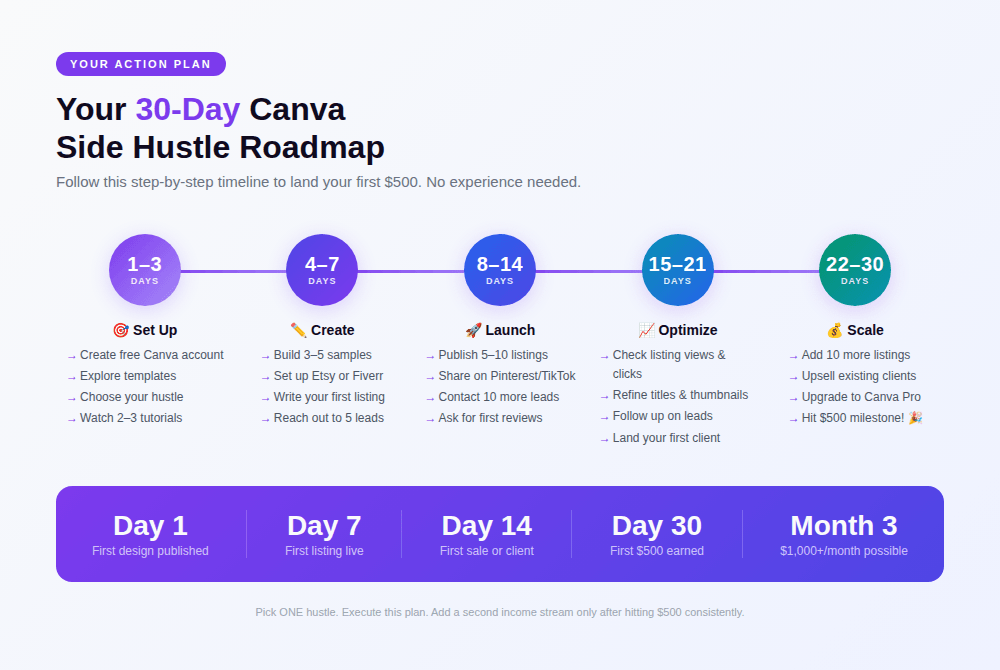
Your 30-Day Plan to Make Your First $500
The secret isn’t picking the ‘perfect’ hustle. It’s picking ONE and taking action fast. Here’s a realistic roadmap.
| Week 1 | Set Up & Learn |
| Days 1–3 | Create a free Canva account. Explore templates. Pick your hustle from this list. Watch 2–3 YouTube tutorials on that specific hustle. |
| Days 4–7 | Create 3–5 samples. If selling templates/printables: set up your Etsy shop. If doing services: set up a Fiverr gig or reach out to 5 potential clients. |
| Week 2 | Publish & Promote: Add 5–10 listings or contact 10 more potential clients. Share work on Instagram, Pinterest, or TikTok. |
| Weeks 3–4 | Iterate & Close: Optimize listings based on views/clicks. Follow up with any leads. Land your first paying client or first sale. Reinvest earnings into Canva Pro. |
Tools, Tips & Common Mistakes
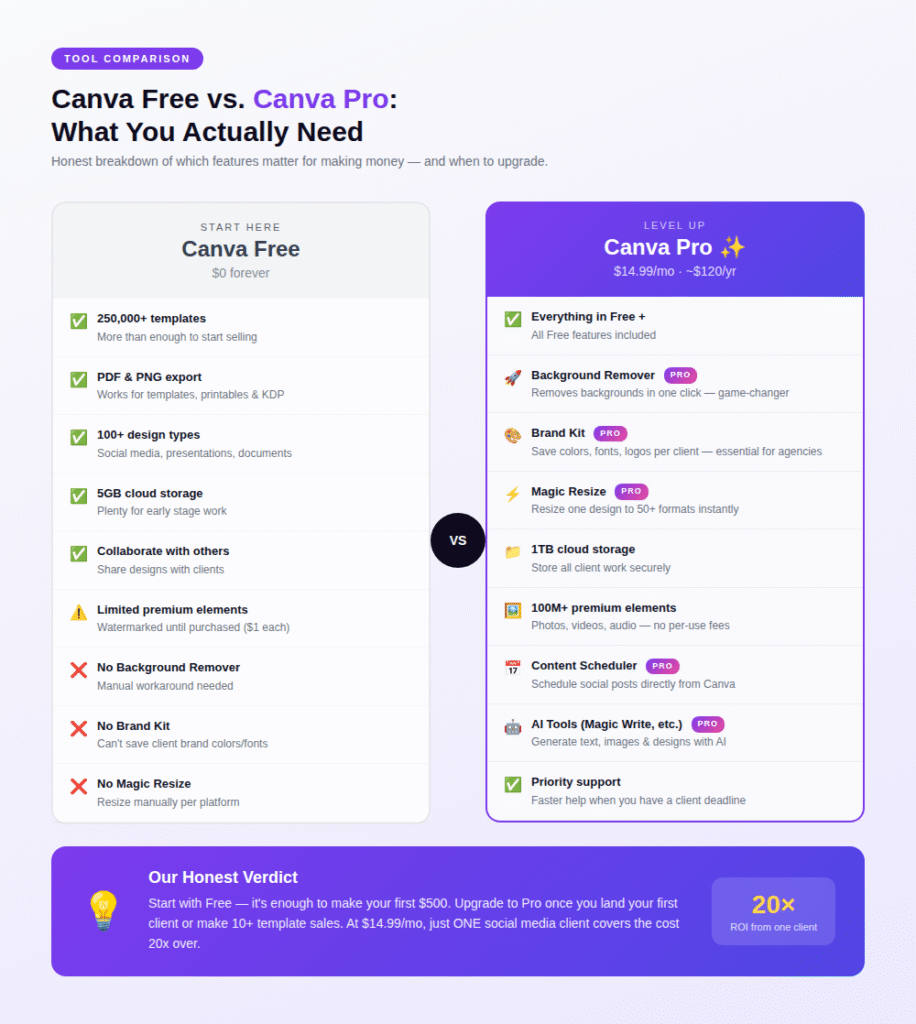
Free vs. Canva Pro: Do You Need It?
Short answer: start free, upgrade when you’re making money.
Canva Pro ($14.99/month or ~$120/year) unlocks:
- Brand Kit (essential for client work and consistent templates)
- Background Remover (saves hours when designing products)
- Magic Resize (resize designs to multiple formats at once)
- Premium elements, fonts, and stock photos
- Content Scheduler for social media
For selling templates: you don’t need Pro, but it speeds up your workflow significantly.
For client work (branding, logos, social media services): Pro pays for itself after your first client.
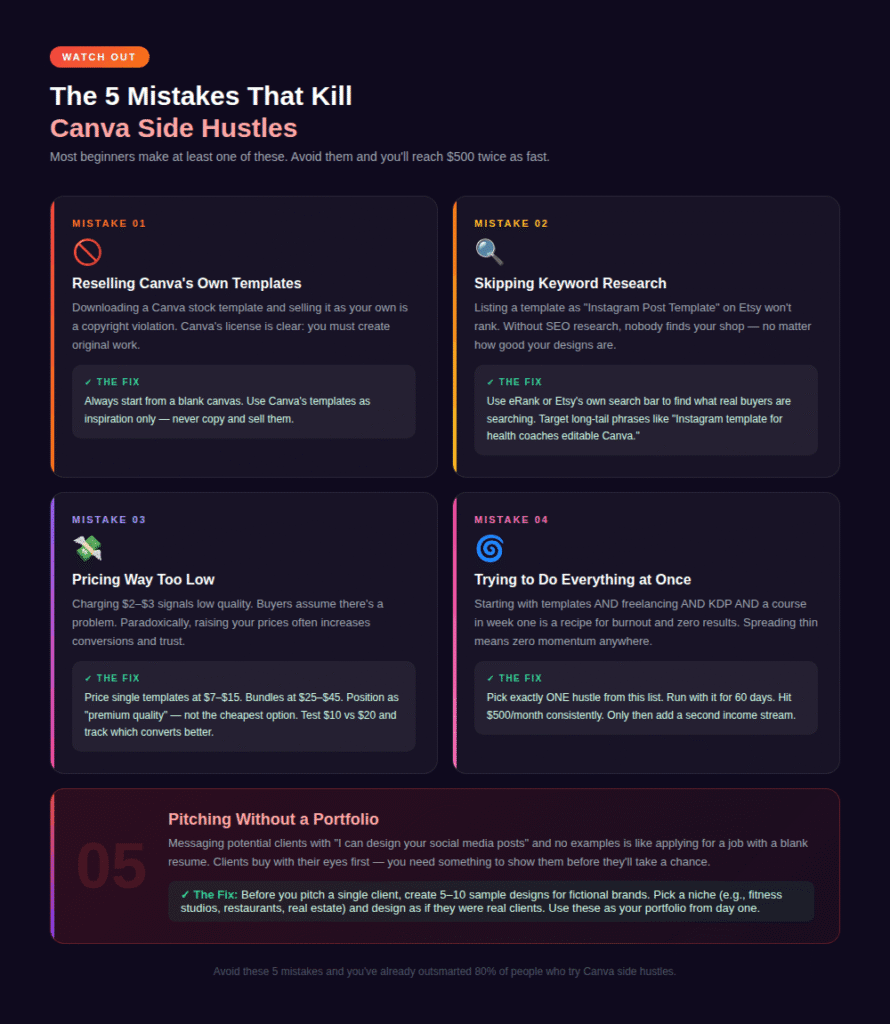
5 Mistakes That Kill Canva Side Hustles
- Starting with templates you didn’t create from scratch. You cannot legally resell a Canva stock template as-is. You must design from scratch.
- Skipping keyword research on Etsy. Your listings live or die on SEO. Use Etsy search suggestions and tools like eRank to find what people are searching for.
- Pricing too low. Charging $3 for a template doesn’t just earn you less — it actually signals low quality and hurts conversions.
- Trying to do everything at once. Pick one hustle. Dominate it. Then add a second income stream.
- Not building a portfolio. Before pitching any client, have 5–10 examples of your best work ready to show. Even make them for fictional brands if needed.
FAQ: People Also Ask (FAQ Schema)
These Q&As are formatted to target Google’s ‘People Also Ask’ boxes. Add FAQ Schema markup in your CMS for each question.
Can I really make money with Canva if I’m not a designer?
Absolutely yes. Canva was built for non-designers. Its drag-and-drop interface, thousands of templates, and intuitive tools mean that anyone can create professional-looking designs with a few hours of practice. Many of the top earners on Etsy selling Canva templates had no formal design background when they started.
How much does it cost to start a Canva side hustle?
You can start for $0. Canva’s free plan includes hundreds of templates, elements, and export options. The paid plan, Canva Pro, costs $14.99/month (or about $120/year) and unlocks advanced features like Background Remover and Brand Kits. Most sellers recommend starting free and upgrading once you land your first paying client or make your first sale.
What is the fastest way to make $500 with Canva?
The fastest path is offering a freelance service — social media graphics, logo design, or resume design — because you can land a paying client within days. Passive income methods like selling Etsy templates typically take 2–6 weeks to see consistent sales. For the absolute fastest $500, reach out to 20 local small businesses offering to create one month’s worth of social media graphics for $500 as an introductory rate.
Is selling Canva templates legal?
Yes, with an important caveat. You must create your templates from scratch — you cannot take a Canva stock template and resell it as-is. Canva’s content license allows you to sell original designs made in Canva, including as editable template links. Always read Canva’s full Content License Agreement, especially if you plan to sell templates that include Canva’s premium stock elements.
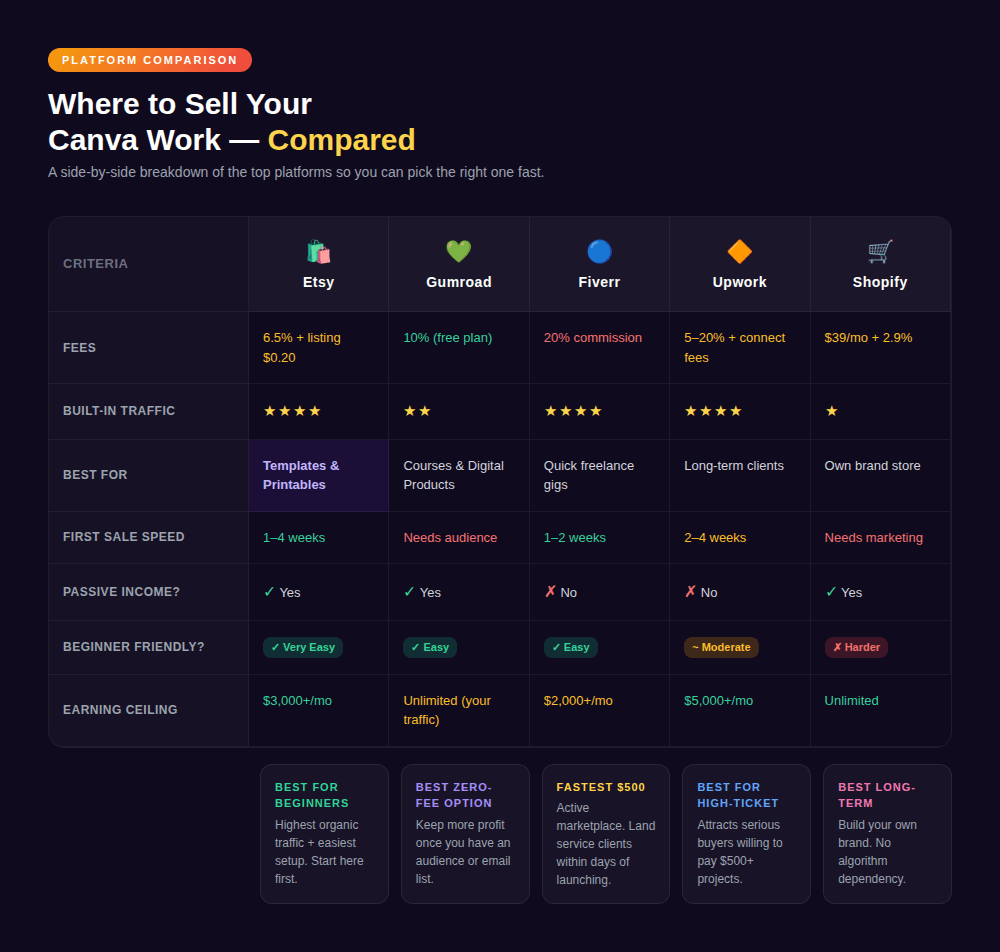
What is the best platform to sell Canva templates?
For beginners, Etsy is the top choice because of its built-in buyer traffic. For zero fees (beyond payment processing), Gumroad is excellent. For the highest earning potential if you already have an audience, selling directly through your own website (via Shopify or WooCommerce) keeps 100% of revenue. Many successful sellers use all three platforms simultaneously.
Do I need Canva Pro to make money?
No, you don’t need Canva Pro to start making money. Canva’s free plan is sufficient to create and sell templates, printables, logos, and most freelance design work. That said, Canva Pro pays for itself quickly — even one small client or a few template sales can cover the monthly cost. Features like Brand Kit and Background Remover become very valuable once you’re working with clients regularly.
How many Canva templates do I need to make before I start selling?
You can list your first template with just one design — but most sellers recommend having 5–10 cohesive listings before launching to give your shop credibility. Aim for 20–30 listings within your first 60 days. Etsy’s algorithm favors shops with more listings, and having a full catalog also increases the average order value as buyers purchase multiple related templates.
Can I use Canva to make money on Amazon?
Yes. The most popular method is Amazon KDP (Kindle Direct Publishing), where you design and publish low-content books like journals, notebooks, and coloring books. You design the interior pages and cover in Canva, export as PDFs, and upload to KDP for free. Amazon handles printing and fulfillment. You earn a royalty on every sale with no upfront costs.